coinpeek
CoinPeek - Bitcoin Price Badge & Gas Tracker



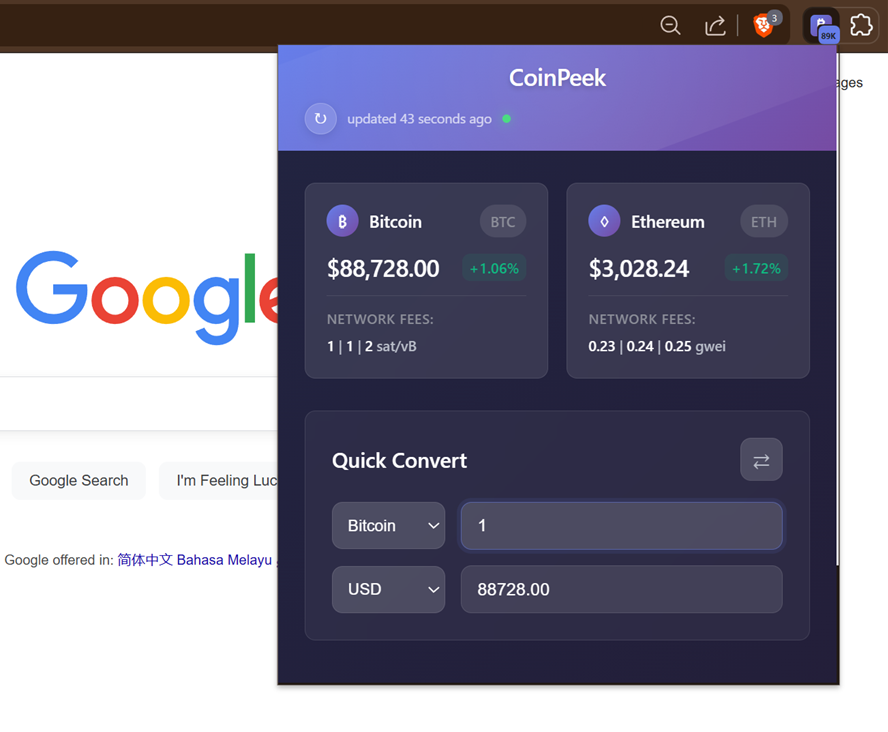
A fast, lightweight Chrome extension that shows real-time Bitcoin price on the extension badge, plus ETH prices, gas fees, and a crypto converter.
🚀 Features
- Real-time Prices: Monitor Bitcoin and Ethereum prices with 24-hour change indicators
- Gas Fee Tracking: View current network fees for both Bitcoin and Ethereum networks
- Smart Converter: Convert between BTC, ETH, and USD with live exchange rates
- Modern Interface: Clean, responsive design with gradient styling
- Background Updates: Automatic price updates every minute via service worker
- Badge Display: Bitcoin price shown in extension badge for quick reference
- Optimized Performance: Enhanced codebase with reduced memory footprint
📦 Installation
From Chrome Web Store (Recommended)
Manual Installation (Developer Mode)
- Download or clone this repository
- Open Chrome and navigate to
chrome://extensions/ - Enable “Developer mode” in the top right corner
- Click “Load unpacked” and select the extension folder
- The extension icon will appear in your Chrome toolbar
🎯 Usage
Basic Usage
- View Prices: Click the extension icon to see current BTC/ETH prices
- Check Gas Fees: Network fees are displayed inline with each currency
- Convert Currencies: Use the bottom converter for quick calculations
- Manual Refresh: Click the refresh button (↻) for instant updates
Advanced Features
- Swap Currencies: Click the ⇄ button to quickly reverse conversion direction
- Badge Monitoring: Bitcoin price is always visible in the extension badge
- Offline Support: Last known prices cached for offline viewing
🔧 Technical Stack
Architecture
- Frontend: Vanilla JavaScript (ES6+), CSS3 with modern gradients
- Backend: Chrome Service Worker (Manifest V3)
- Storage: Chrome Storage API for data persistence
- Updates: Chrome Alarms API for background synchronization
Performance Optimizations (v1.1.0)
- ✅ Eliminated code duplication (removed ~25% of codebase)
- ✅ Centralized configuration management
- ✅ Optimized DOM element caching
- ✅ Unified API call architecture
- ✅ Enhanced error handling with fallbacks
🌐 API Integration
Primary Data Sources
| Service | Purpose | Fallback Available | |———|———|——————-| | CoinGecko | BTC/ETH prices | ❌ (Primary only) | | Blocknative | Ethereum gas fees | ✅ (Default values) | | mempool.space | Bitcoin gas fees | ✅ (2 additional APIs) |
Reliability Features
- Multiple Bitcoin gas fee APIs with automatic failover
- Graceful degradation to cached data during outages
- Default gas values when all APIs are unavailable
🛠️ Development
Project Structure
coinpeek/
├── manifest.json           # Extension configuration
├── background-simple.js    # Optimized service worker
├── popup/                  # User interface
│   ├── popup.html
│   ├── popup.css
│   └── popup.js
├── config/
│   └── constants.js        # Centralized configuration
├── utils/
│   └── formatters.js       # Shared utilities
├── icons/                  # Extension icons (16, 48, 128px)
├── dev-tools/              # Development utilities (optional)
└── docs/
    ├── README.md           # This file
    └── TECHNICAL_DOCS.md   # Developer documentation
Development Setup
- Clone the repository
- Make your changes
- Reload extension in
chrome://extensions/ - Test functionality in popup and background service
Adding Features
- Review
TECHNICAL_DOCS.mdfor architecture guidelines - Use centralized constants in
config/constants.js - Follow the established DOM caching patterns
- Implement proper error handling
🔒 Privacy & Security
- No Data Collection: No user data is collected or transmitted
- Local Storage Only: All data stored locally in Chrome storage
- Secure APIs: All API calls use HTTPS encryption
- Minimal Permissions: Only requests necessary Chrome permissions
- Open Source: Full source code available for review
Permissions Explained
This extension requests only two minimal permissions:
| Permission | Why It’s Needed | What It Does |
|---|---|---|
storage |
Cache prices locally | Saves last known prices so you see data instantly when opening the popup. Data never leaves your device. |
alarms |
Background updates | Refreshes prices every minute automatically. Uses Chrome’s efficient alarm system, not a constant background process. |
Host Permissions (API access only):
| API | Purpose |
|—–|———|
| api.coingecko.com | Fetch BTC/ETH prices (public API) |
| api.blocknative.com | Fetch ETH gas fees |
| mempool.space | Fetch BTC network fees |
| api.blockchain.info | Fallback for BTC fees |
| api.blockchair.com | Fallback for BTC fees |
What we DON’T request:
- No
<all_urls>- we can’t access your browsing - No
tabs- we can’t see your open tabs - No
history- we can’t see your browsing history - No
cookies- we can’t access your cookies
📋 Version History
v1.1.1 (Current)
- 🔧 Fixed Bitcoin badge not displaying on extension icon
- 🌐 Improved CoinGecko API reliability with response validation
- ⚡ Intelligent data refresh (only when data >45s old)
- 📉 Reduced API calls by ~70% with smart caching
- 🐛 Enhanced debug system and error handling
v1.1.0
- 🚀 Performance optimizations
- 🔧 Code refactoring and deduplication
- 📱 Enhanced DOM element caching
- 🎯 Centralized configuration management
- 🐛 Improved error handling
v1.0.2
- Initial release with basic functionality
- Real-time price monitoring
- Gas fee tracking
- Currency conversion
🐛 Troubleshooting
Common Issues
- Prices not updating: Check internet connection and refresh manually
- Extension badge not showing: Ensure extension has proper permissions
- Gas fees showing dashes: Multiple API failures, data will restore automatically
Getting Help
- Check the browser console for error messages
- Reload the extension from
chrome://extensions/ - Clear Chrome storage if data appears corrupted
📞 Support
- Issues: Create an issue in the GitHub repository
- Feature Requests: Submit suggestions via GitHub Issues
- Documentation: See
TECHNICAL_DOCS.mdfor developer information
Contributing
Contributions are welcome! Please read our Contributing Guide for details on how to submit pull requests, report bugs, and suggest features.
Support
If you find this extension useful, consider supporting its development:
License
This project is open source under the MIT License.
Privacy
See our Privacy Policy for details on data handling.
CoinPeek - Built for the crypto community